
These Days, Everything Changes Too Fast to Follow. This Plugin Keeps the FOMO Away.
I built a Claude Code plugin that fetches changelogs, scores each item for relevance, and remembers where I left off. Staying current stops being a chore.
A few days away from the keyboard. When I came back, I opened Claude Code’s changelog to catch up. And immediately hit a wall.
Which version did I read last? I genuinely couldn’t remember. Claude Code ships fast (over 140 changelog entries a week on average), and after a few days away, the gap had grown into something that felt impossible to bridge cleanly. I started scrolling. Skimming. Trying to find my place. Each entry looked vaguely familiar, or didn’t, and I couldn’t tell which.
That small moment of confusion snowballed. What started as “I’ll catch up in five minutes” kept getting pushed off. Eventually I just let it go.
This post is about the plugin I built to stop that from happening again. Not a grand system. Just a small tool that fetches what’s new, filters out what doesn’t apply to me, and remembers where I left off.
The Problem With Keeping Up
The bottleneck isn’t access. Changelogs exist. Release notes are published. The information is there.
The real issue is triage. When Claude Code pushes multiple updates a day, most entries don’t apply to you. Windows fixes. IDE integrations you don’t use. Subscription tiers you’re not on. Wading through all of it just to find the two relevant lines is enough friction to make you stop checking.
And even when you do read, you lose your place. The version cursor problem: “was it 2.1.260 or 2.1.261?” Sounds trivial. But that small gap is what breaks the habit. Once you’re not sure where you left off, catching up feels like work. And work you can skip usually gets skipped.
What I Built
I built a Claude Code plugin called feed-digest. You configure sources (GitHub releases, RSS feeds, HTML changelog pages) and run it. It fetches everything since your last read, scores each item for relevance, groups the results by topic, and opens a digest in your browser.
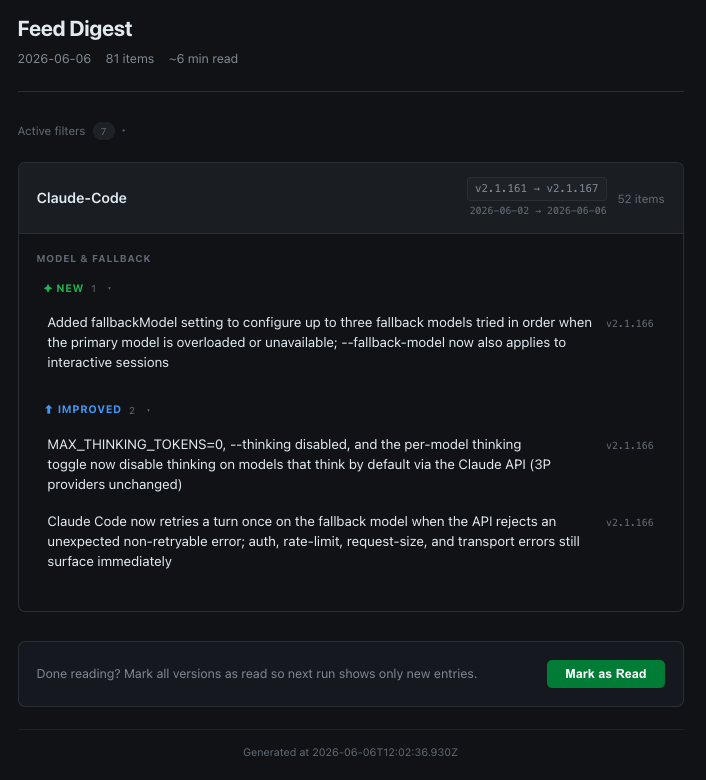
The whole thing runs as a Claude Code skill. Under the hood, it uses a two-stage subagent pipeline: one Sonnet agent per source fetches, scores, and categorizes items. A Haiku agent then canonicalizes the output into a clean schema. Both stages run in parallel across all your configured sources.
Each run takes about 30–60 seconds. The output is a dark-mode HTML page with your relevant changes, grouped by topic and change type: new, improved, fixed.
How the Filtering Works
Every item gets a relevance score from 0 to 10. The agent reads the item against your configured preferences and decides how much it applies to you. Low scores get filtered out. They’re not deleted (you can expand a “filtered items” section if you want to see them), but they don’t crowd the main digest.
Filtering works at two levels.
User filters apply across all your sources. If you’re not on Windows, you say so once. If you don’t use JetBrains, same. These preferences travel with you across every feed you configure.
Source filters let you go more granular. Maybe you follow Claude Code releases but don’t care about the Ultra plan features. Or you track a tool but only want the changes relevant to your specific setup. Each source in your config gets its own ignore list and interest list.
The result is a digest that’s actually about you. Not a raw feed. Your preferences, applied by an LLM that understands context.
Closing the Loop: Mark as Read
At the bottom of every digest there’s a bar that reads: “Done reading? Mark all versions as read so next run shows only new entries.” One button. One click.
That click is the only thing that advances the version cursor. The plugin itself never writes state automatically. Every run is safe to re-run. You see the same digest until you explicitly say you’re done.
This was a deliberate design choice. Automatic state updates feel fragile. What if the run errored halfway through? What if you opened the digest but didn’t finish reading? The human click is the signal that matters. You decide when you’re done, not the tool.
Tradeoffs and What’s Still Missing
LLM scoring isn’t perfect. Some items land in the wrong category. Some get filtered that shouldn’t. The signal-to-noise ratio is good enough that I trust it day-to-day, but it’s not perfect.
The plugin also runs on demand. There’s no push notification, no background process. You have to remember to run it. For me that’s fine. I’d rather pull when I’m ready than be interrupted. But it’s worth knowing.
Slack and other source types are on the roadmap. The architecture supports adding new fetchers, and reading from Slack channels is an obvious next step for people who track announcements there.
Worth Keeping Up With
Claude Code averages around 140 changelog entries per week. In its most active weeks, that number climbs past 180. Other tools I use daily (frameworks, CLIs, APIs) are on similar trajectories. The era of “stable, versioned, read-once” software is mostly gone.
Fast shipping is good. But it creates a new kind of cognitive load. This plugin solved it for me. Not by reading everything, but by making the relevant parts findable and the progress trackable.
If you’ve solved this differently (a different tool, a different habit, a different philosophy entirely), I’d love to hear about it.